
.png)


FastCapture for Web Apps
- Free
- 4.21
- V1.0.0
Screen Recorder & Screenshot Tool
Record your screen, capture screenshots, annotate, and share them instantly. FastCapture is a lightweight, all-in-one Chrome extension for video recording, image capture, and annotation - no upload to external servers. Everything is processed locally in your browser.
VIDEO RECORDING
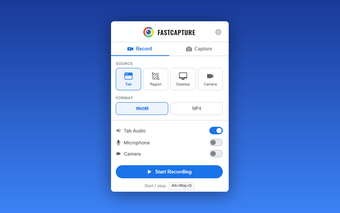
Record anything on your screen with multiple source options:
- Tab - Record the current browser tab with audio
- Desktop - Record your entire screen or a specific window
- Region - Draw a custom rectangle to record only a specific area
- Camera - Record from your webcam
Export your recordings in WebM (VP8/VP9) format. Pro users can also export in MP4 (H.264) or GIF (animated clips).
Recording controls:
- Pause & Resume - Take a break and continue recording later
- Discard - Delete the recording without saving
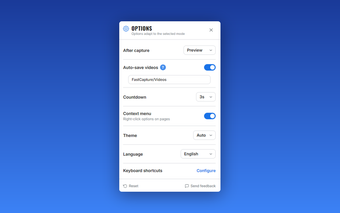
- Configurable countdown - 3s, 5s, or 10s delay before recording starts
- Customizable keyboard shortcuts to start and stop recording instantly
SCREENSHOT CAPTURE
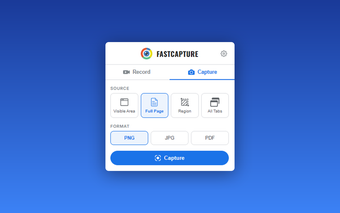
Capture any part of any webpage with four powerful modes:
- Visible Area - Capture exactly what you see on screen
- Full Page - Automatically scroll and stitch the entire webpage into a single image
- Region - Draw a rectangle to capture a specific area
- All Tabs - Capture every open tab in the current window at once
Save your screenshots as PNG (lossless), JPG, WebP (Pro), or PDF. Full-page and multi-tab captures work seamlessly with all formats, including multi-page PDFs.
️ANNOTATION TOOLS
Draw, write, and highlight directly on any webpage:
- Freehand drawing with adjustable brush size and color
- Text, sticky notes, arrows, and shapes
- Blur tool to hide sensitive information before capturing
- Laser pointer for live presentations
- Image insertion for logos, diagrams, and references
- Three modes: edit (draw), display (view annotations), hidden (clean page)
- Side panel mode: annotation controls stay invisible to screen recordings
Annotate before or after your capture. Everything is rendered as a transparent overlay - the page itself is never modified.
CAMERA OVERLAY
Add a floating webcam overlay to your recordings. Perfect for tutorials, presentations, and product demos. Choose from multiple shapes, resize and reposition freely, and toggle visibility during recording.
QUICK CAPTURE
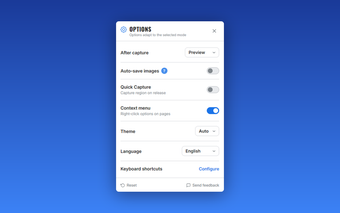
Enable Quick Capture in settings to instantly capture a region the moment you release the mouse - no need to click Confirm. Ideal for rapid-fire screenshots when you need to capture multiple areas quickly.
PREVIEW & SHARE
After each capture, preview your recording or screenshot before saving:
- Video player for recordings
- Image viewer for screenshots with zoom
- Gallery view for multi-tab captures
- Download as file
- Copy to clipboard (images)
- Send via Gmail - attach your screenshot to an email draft directly from FastCapture
- Print - send screenshots directly to your printer
- Download as ZIP - bundle all tab captures into a single archive
️KEYBOARD SHORTCUTS
Work faster with built-in keyboard shortcuts for recording, visible area, full page, and region capture. All shortcuts are fully customizable via chrome://extensions/shortcuts.
️RIGHT-CLICK MENU
Access all capture options from the right-click context menu on any webpage. The context menu can be enabled or disabled in settings.
THEMES
Choose between Light, Dark, or Auto theme. Auto mode follows your system preference, so FastCapture always matches your environment.
PRIVACY & SECURITY
- 100% local processing - No data is uploaded to external servers
- No tracking, no analytics - Your captures stay on your device
- Minimal permissions - Only requests what is strictly necessary
- Gmail integration uses OAuth2 - Your credentials are never stored
Loading…
App specs
License
Free
Version
1.0.0
Latest update
Platform
Web Apps
OS
Chrome
Language
English
Available languages
- Spanish
- English
- French
- German
- Italian
- Portuguese
- Russian
- Dutch
- Polish
- Chinese
- Turkish
- Arabic
Developer
Program available in other languages
FastCapture for Web Apps
- Free
- 4.21
- V1.0.0
User reviews about FastCapture
Have you tried FastCapture? Be the first to leave your opinion!
Add reviewTop downloads Screen Capture for Web Apps
Top downloads Screen Capture for Web Apps
Top downloads Screen Capture for Web Apps
Related topics about FastCapture
Latest articles

Microsoft’s Xbox shake-up looms: Obsidian reportedly among studios in talks

Where to watch Spain vs Austria for free: La 1, RTVE Play, and all the legal options

Meta reportedly readies Meta Compute: a cloud rival to AWS and Azure

Ghost in the Shell remake announced as fully hand-drawn: no generative AI at all
World of Warcraft addons for 2026: best picks after Midnight’s shake-up
Laws concerning the use of this software vary from country to country. We do not encourage or condone the use of this program if it is in violation of these laws. Softonic may receive a referral fee if you click or buy any of the products featured here.